Digital workers find the way. You keep the decisions.
Cenmo is not a tool that waits to be told. Your digital workers watch the business, work out what is worth doing, and get it done — but the call is always yours. A risk line splits the two: inside it they carry on; past it they stop and wait for you. They are still learning, which is exactly why the decision, and the responsibility, stay with a person.
Stock-out risk on a SKU → restock priority already reordered
Nobody assigns it work.
Most AI tools sit still until you type something. Cenmo runs a loop: it watches, it judges what matters, it acts inside the boundary you drew, it stops the moment it reaches that boundary, and it keeps whatever worked. You show up for the decisions — fewer errands to hand out, not fewer calls to make.
Watch
Orders, inventory, ad spend, reviews, competitors, FX, transit times. Your digital workers watch the live state of the business — not whatever context you happened to paste in.
Judge
Seeing is not doing. It ranks by what a day of delay actually costs: decide now, decide this week, just so you know. For most things the right move is to leave them alone — and it will.
Act
Low-risk work simply gets done. Copy rewritten, price adjusted, restock plan updated, channels resynced, replies drafted. It logs the action rather than asking for permission.
Stop at the line
Past the risk line it stops itself rather than pushing all the way through on one guess. What reaches you is a choice and one line of reasoning — not a report to read. You decide, and the responsibility is yours; its job is only to get that decision ready to be made.
Compound
Results flow back in. What worked, what you sent back, what you prefer — all of it becomes the prior for the next round. It keeps learning, so over time it brings you fewer of the same questions.
In one line: the AI finds the way and does the work; a person decides and carries the responsibility. The loop is not a metaphor — it is what SAL looks like at runtime: the level decides how far step 3 goes, and exactly where step 4 stops.
Month one, a new hire. Month six, a veteran.
A tool is spent each time you use it. A digital worker is the opposite — every round leaves more of your business behind inside it, and the next round needs less from you.
Business context
Your SKUs, channels, customers, cost structure, which suppliers actually deliver. None of it has to be explained a second time.
Your judgment
What you approved, what you sent back, when you would rather go slow. It learns your trade-offs, not generic best practice.
Proven plays
A play that actually produced a result is frozen into a skill — and the next worker has it on day one, without repeating the discovery.
Which is why the value of this is not on the day you sign. It is in month three.
One platform, four zones you build a workforce in
Each zone answers a different question — and the same trust rules run through all four.
Where a digital worker is made. Design its persona, give it skills, wire the tools it may touch, set its guardrails, then test it before anyone depends on it.
- Digital Worker Studio
- Capability orchestration
- Skill management
- Tool Gateway config
- Guardrails
- Data-zone classification
Where you skip the building. Browse workers and solution templates that already exist, and put one on your team the same afternoon.
- Pre-built digital workers
- Solution templates
- Industry suites
Where the work actually happens — people and agents on the same board. Agents start the work and push it forward themselves; your team still signs off on the things that matter.
- Task board
- Agent chat
- Human-in-the-loop approvals
- Notifications
- Slack / Feishu / DingTalk
Where you stay in charge. Who may do what, which model runs where, what it costs, and a full record of every step an agent took.
- Identity & tenancy
- Model routing
- Billing & quotas
- Agent Trajectory Store
- Cross-border data governance
Three screens you actually work in
Screens from the desktop build. The data shown is a demo dataset, not a live account.
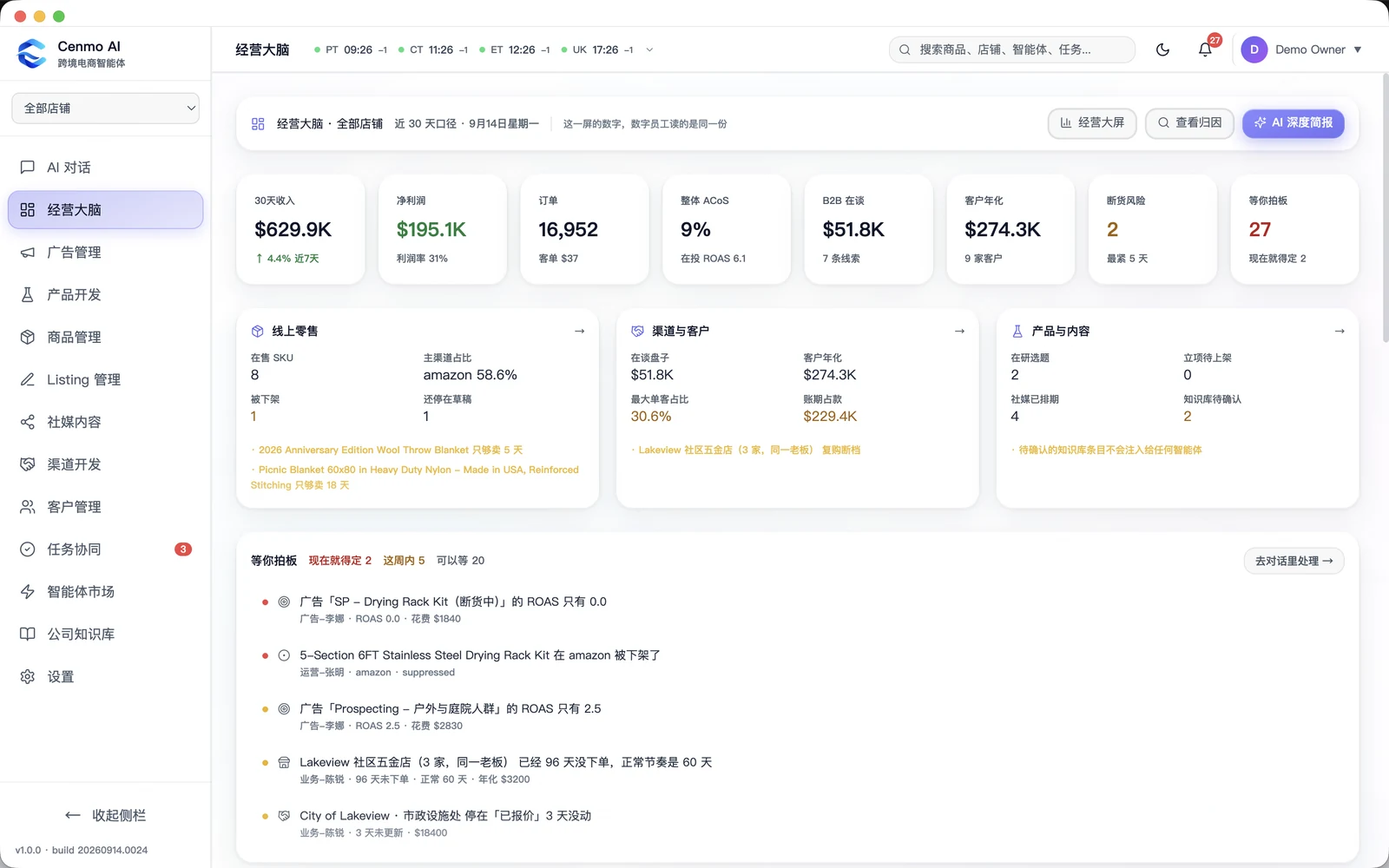
Operations brain
Every store on one screen — revenue, margin, ACoS, B2B pipeline, stock risk, and what is waiting on you. The line at the top says it: your digital employees read exactly these numbers.
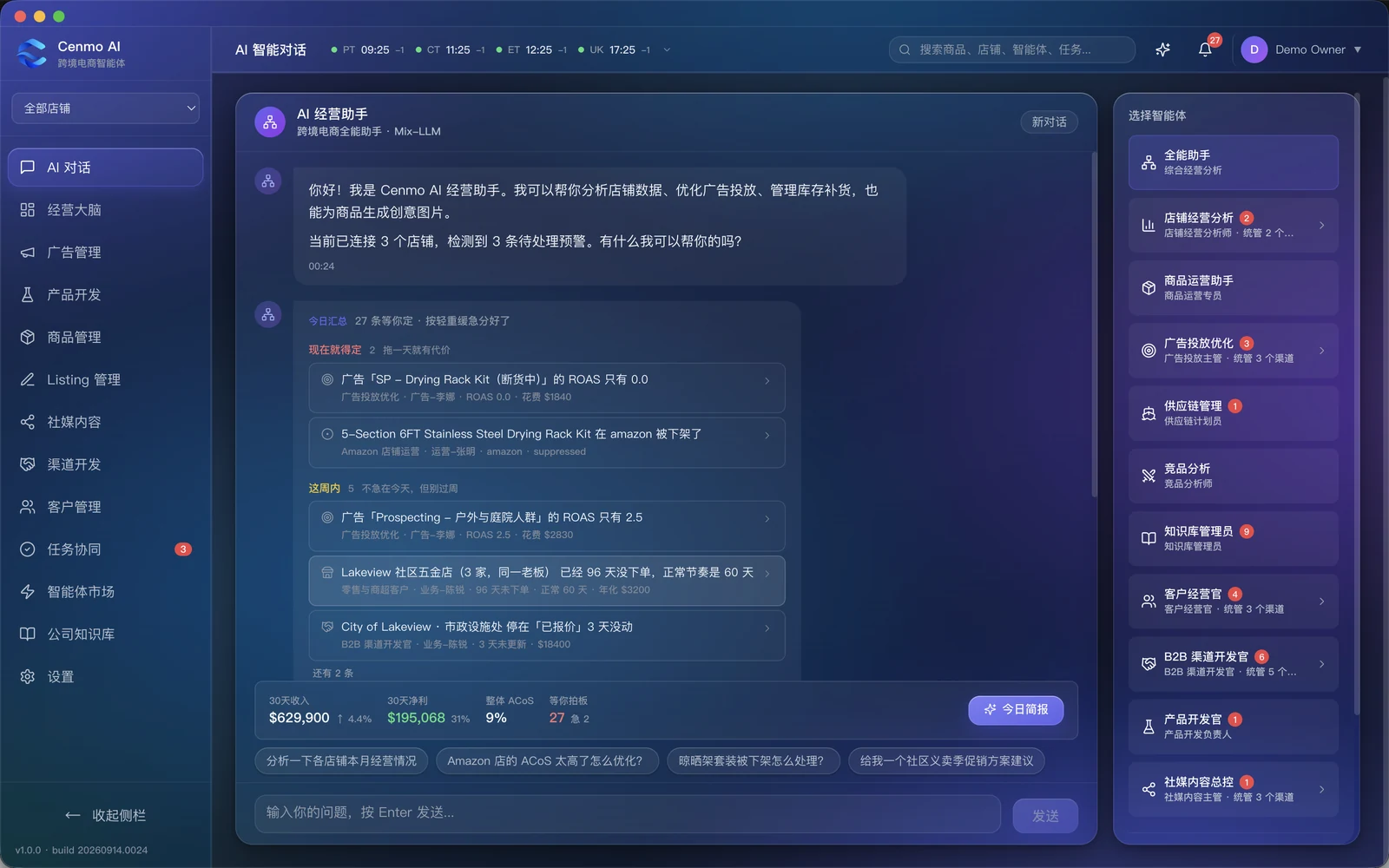
Agents and today’s calls
Coming soonThe roster down one side, the day’s decisions down the middle — already sorted into decide now, this week, and can wait. One line each; open it and you get options, not a report.
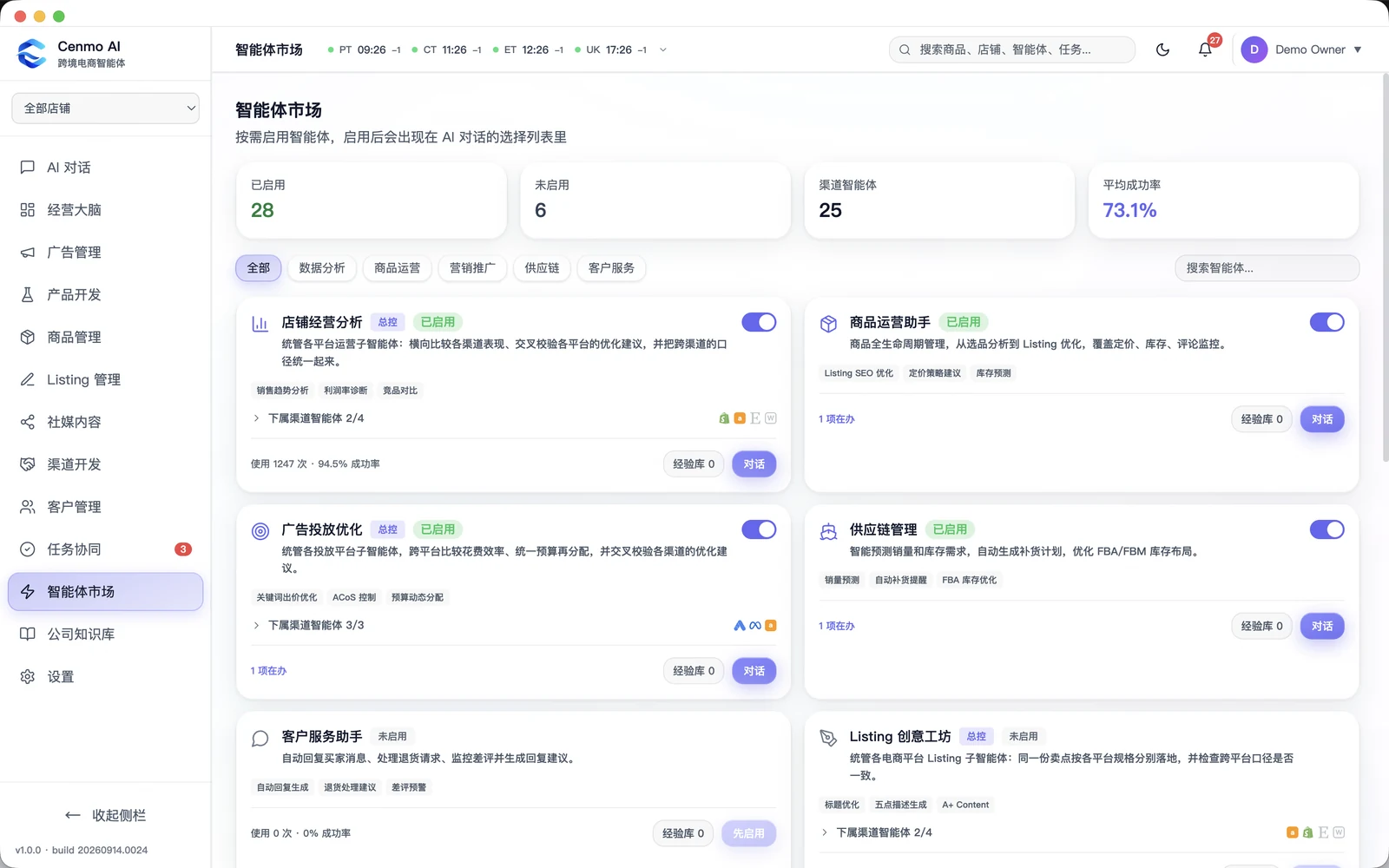
Agent marketplace
Switch an agent on and it appears in the chat list. Supervisors carry channel agents beneath them — an ads lead over three platforms, a listings lead over four — each with its own run count and success rate.
Twenty reports on one screen is not a decision
A department of agents produces a flood. The hard part was never generating the work — it is turning what came back into something a person can actually act on.
Sorted by what it costs you to wait
Every item lands in one of three buckets: decide now — waiting a day has a price; this week — not today, but do not let it roll over; can wait — noted, read it when you have a moment. One line each. Open it and you get the options, not a report.
One set of numbers, not two
Revenue, margin, ACoS, stock risk — your agents read exactly the figures on your screen. There is no separate AI dashboard to reconcile against the real one.
Agents with a reporting line
Not a toolbox — a roster. A store analyst, an ads lead across three channels, a supply planner, a B2B developer across five. The social lead does not write posts; it breaks the work down to the channel agents under it.
Built against a real cross-border operation, not a demo script — down to details like keeping a handled item in place instead of pulling it out, so the list does not jump under your cursor.
Every action carries a risk level. The level decides who signs.
SAL — Security Assurance Level — is a 0-to-4 ladder attached to actions, not to agents. It does two things at once: inside the line it lets the AI move on its own; past the line it hands the decision back to a person. An agent never decides its own authority — the action does.
The point is not that AI is dangerous. It is that you can tell a customer, on paper, exactly which actions a machine may take alone and which ones a person put their name to.
We onboard an agent the way you onboard a person
An agent is not deployed because it was built. It is deployed because it passed — and it is retired when it stops earning its seat.
- 01Recruit
- 02Train
- 03Certify
- 04Deploy
- 05Measure
- 06Improve
- 07Retire
Certification is a gate, not a formality — an agent that fails it goes back to training instead of into production.
Four planes, one gate everything passes through
You are the factory. Production is not your problem — the US market is.
Five lines, one engagement
Cenmo Insight
Paid product research and feasibility. The entry point to every engagement.
Cenmo Operate
Full-platform, done-for-you operations — online stores, marketplaces, social, ads.
Cenmo OS
The agent system, deployed on your own servers or cloud. The asset you can keep.
Cenmo Ground
US physical landing — retail, warehousing, trade shows, government orders. Chosen by the research.
Cenmo Supply
First-leg freight, customs classification and US warehouse placement. Here the savings are logistics.
What can’t be copied

Overseas data base
Collected and labeled in the US, to zip-code granularity.

US physical entity
Stores, warehouses, sales, mall and government channels.

Proven on our own operation
We run a cross-border business ourselves, and a Skill only ships after it has earned its place there. What you get has been used in production before it was ever sold.
Both ends of the chain
Manufacturing and sourcing in Asia, platforms and market in the US. Most firms have one end. We have people on both.